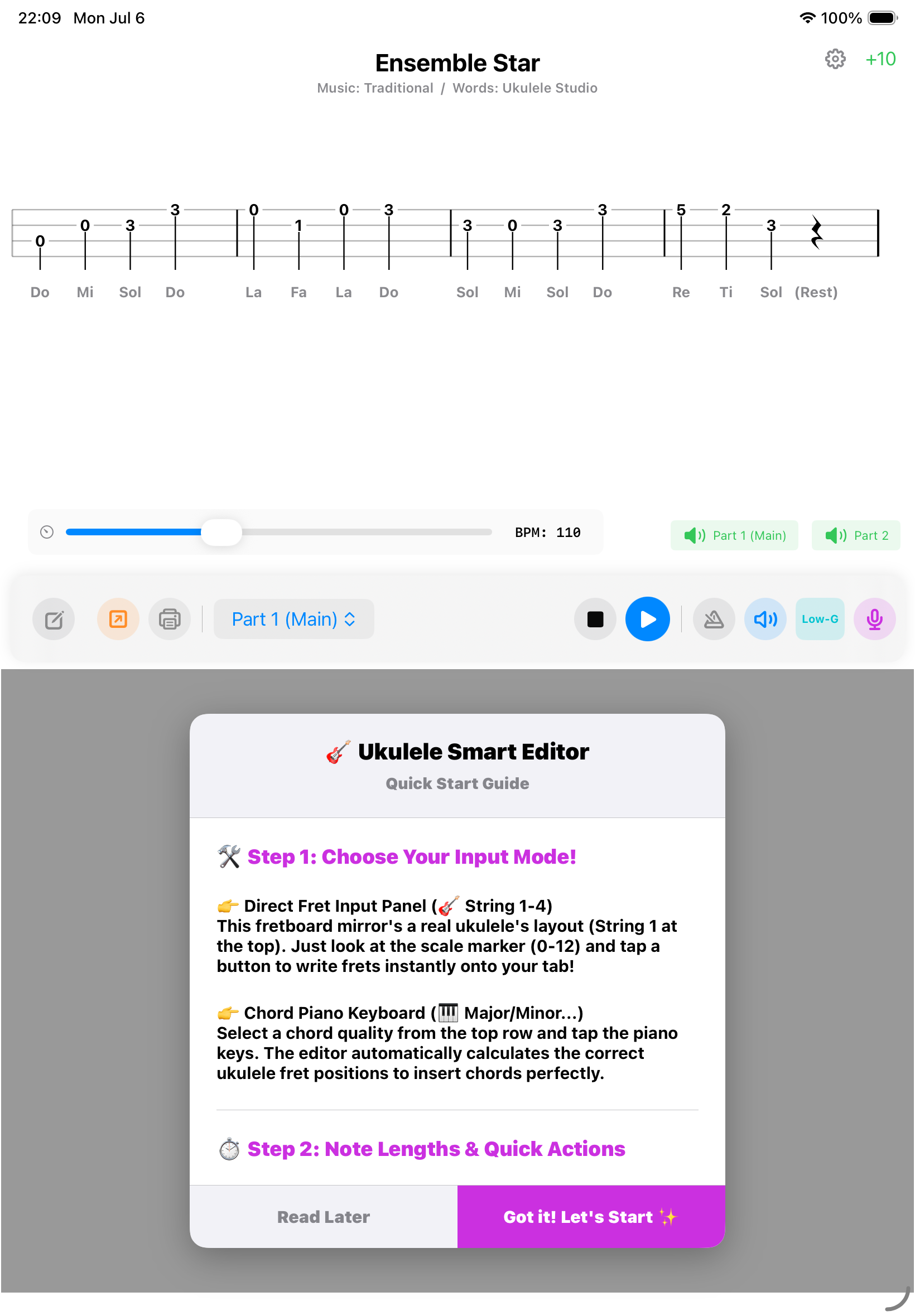
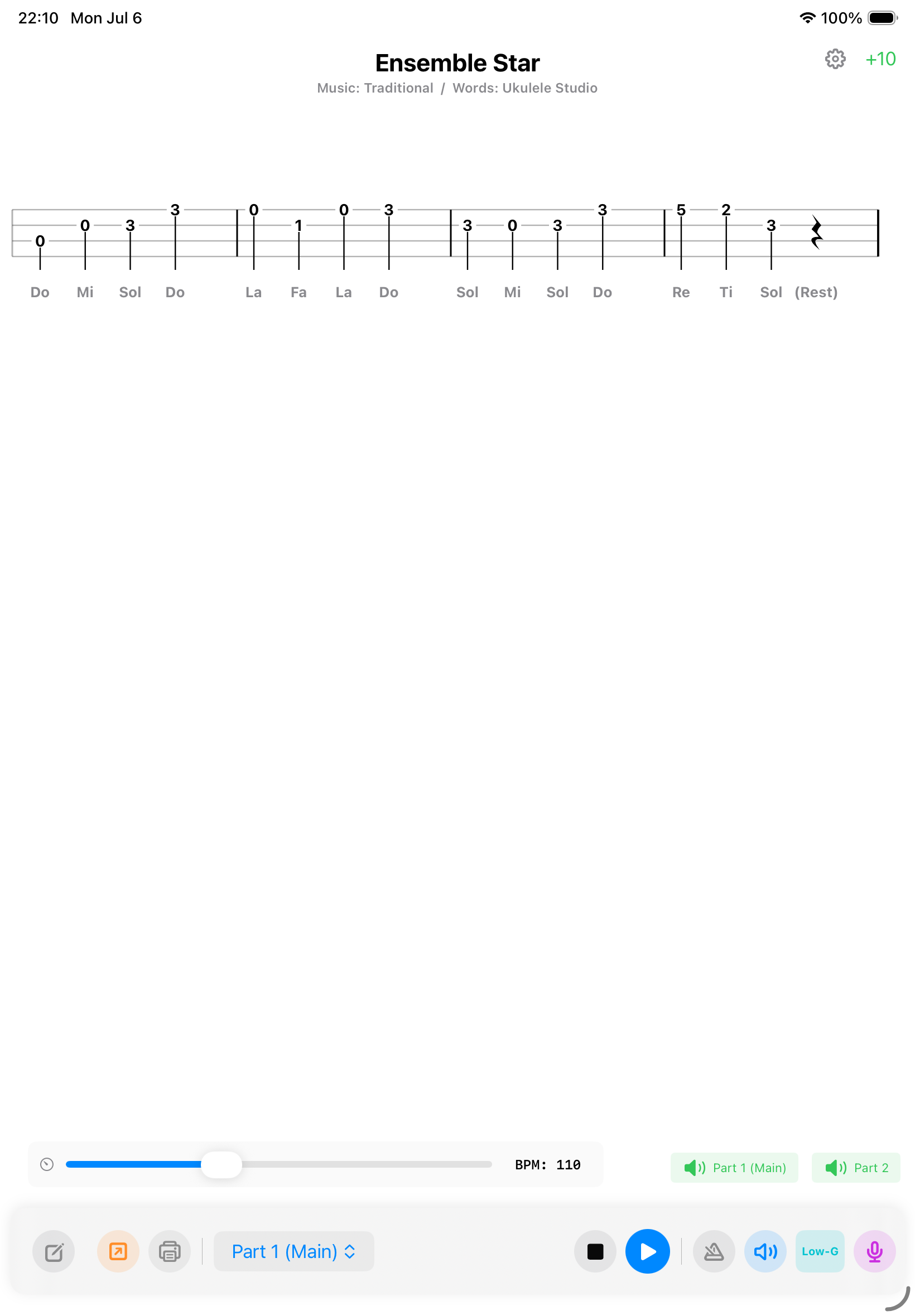
ウクレレ練習を一変させる、
次世代のタブ譜ビューア

Next-Gen Tab Viewer:
Transform Your Practice

「楽譜のページを手でめくるストレス」から、あなたを完全に解放します。

Completely free yourself from the stress of manual page-turning.

Download on the App Store (for iOS)

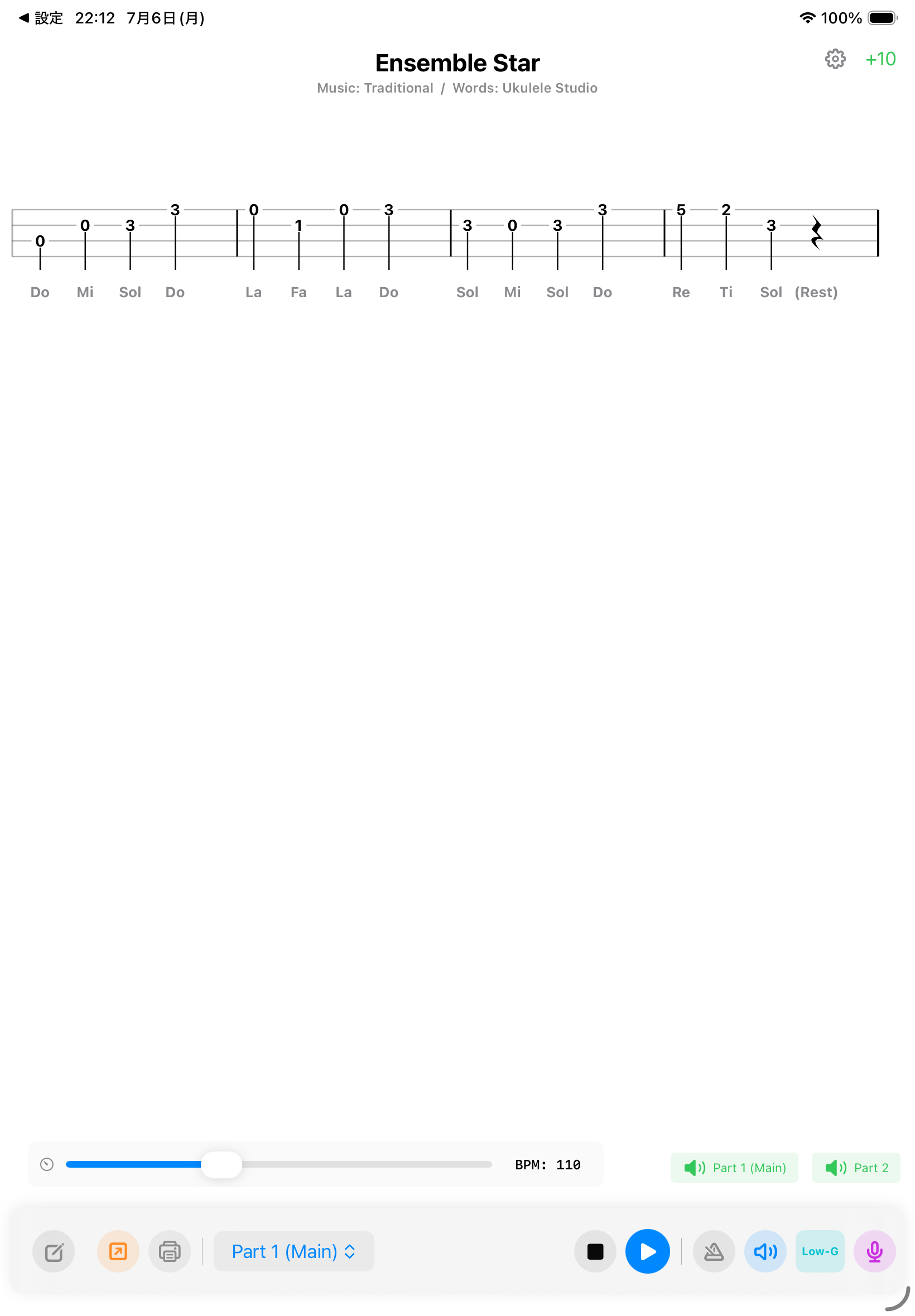
ウクレレ楽譜を見て、聴いて、練習することだけに極限まで特化した、プレイヤーのための専用スタジオです。

A dedicated studio focused entirely on viewing, listening to, and practicing ukulele scores.
JP1
JP2
JP3
JP4
JP5
EN1
EN2
EN3
EN4
EN5
✨ 【主要機能 & 圧倒的なメリット】 ✨ 【Key Features & Benefits】
🎯

1.【練習特化】
ウクレレを抱えたまま、迷わず、止まらずに練習できる

1. 【Focused Practice】
Practice without hesitation while holding your ukulele

本物の音で正しい和音を再現。全自動スクロール機能で手がふさがっていても安心です。

Reproduce correct chords with real sounds. Hands-free practice with auto-scroll.

🎧

2.【自由な再生】
あなた専属の「アンサンブル・パートナー」

2. 【Free Playback】
Your personal "Ensemble Partner"

再生速度を自由に変更。自分以外のパートだけを鳴らす「ぼっちアンサンブル」も可能です。

Freely adjust tempo. Play along with "Solo Ensemble" by muting your own part.

🏆

3.【演奏評価】
ゲーム感覚で、気がつけば上達している

3. 【Evaluation】
Improve naturally through a game-like experience

音程とタイミングを精密センサー分析。日々の成長をスコアで可視化します。

Precise sensor analysis of pitch and timing. Track your growth through scores.

🎹

4.【無制限の楽譜】
世界標準の「ABCフォーマット」に対応

4. 【Unlimited Scores】
Supports Global Standard "ABC Format"

75種類以上のコードボタンで、プロ規格の4和音を一瞬で自動インサートできます。

Insert pro-grade 4-note chords instantly with over 75 chord buttons.

🖨️

5.【PDF・印刷】
画面の外へ、あなたの音楽を連れ出そう

5. 【PDF & Print】
Take your music beyond the screen

黄金比レイアウトで、プロ並みの美しいPDFを一発出力。シェアにも最適です。

Export beautiful, pro-quality PDFs with golden-ratio layouts in one tap.

💝 【広く永く使っていただくために:無料機能 ✕ 開発へのご協力】

💝 【To Use Widely and Forever: Free Features & Support】

「タブ譜を見る」「音を聞いて再生する」基本機能は、【完全無料】でずっとご利用いただけます。

Basic functions like "Viewing Tabs" and "Playback" are 100% free forever.

高度な機能をご活用の際は、開発を応援していただけますと幸いです。皆様の協力がアプリを永続させる原動力となります。

Your support through premium features helps us provide ongoing updates and maintenance.

🔗 姉妹アプリのご紹介

🔗 Sister Apps
Ukulele Tuner Icon

Ukulele Tuner Ukulele Tuner

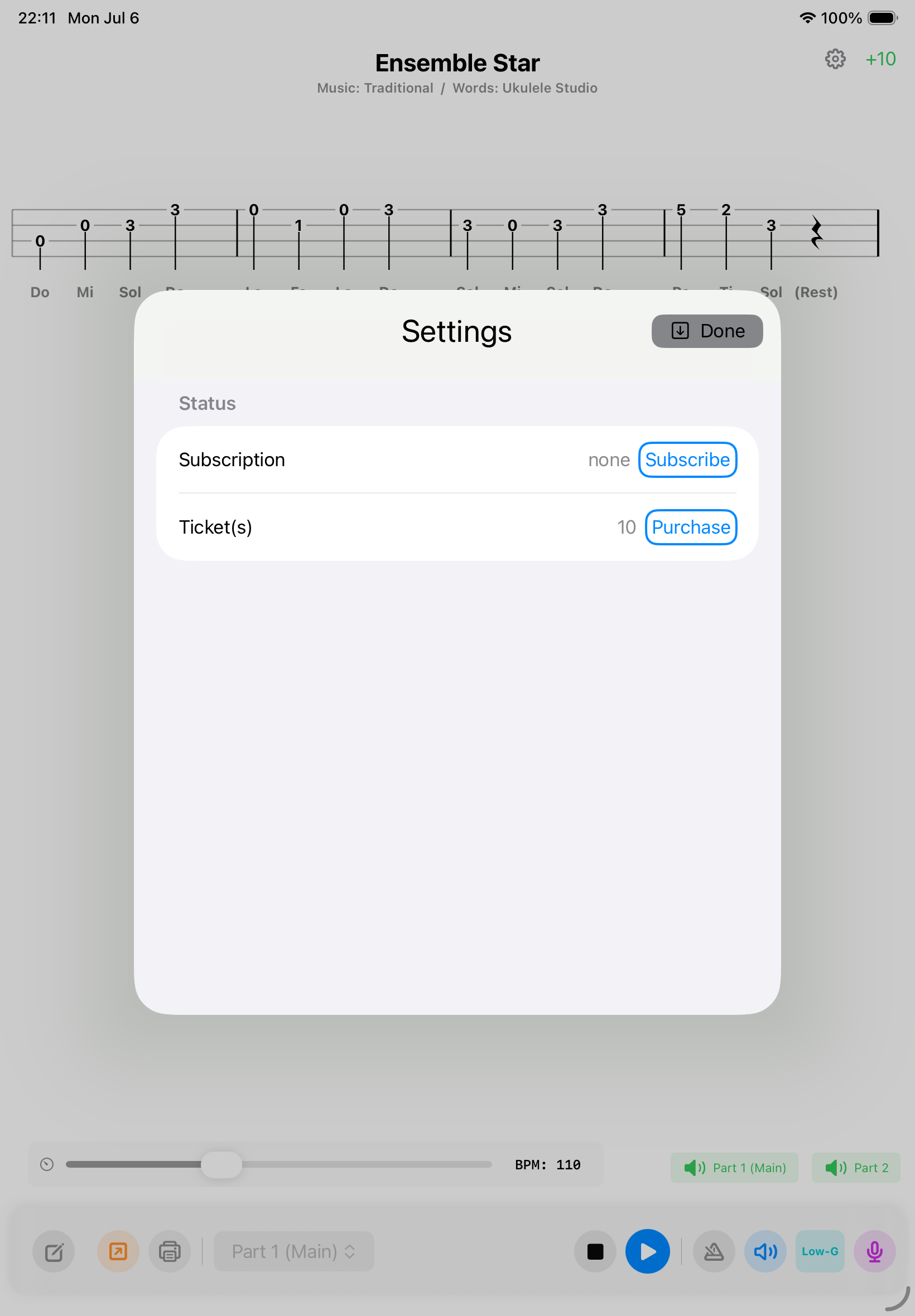
iPhone & iPad用 AI自動コード検出・ウクレレチューナー。正確なチューニングはもちろん、弾いた音からAIがリアルタイムにコードを検出してサポートします。

AI Chord Detection & Ukulele Tuner for iPhone & iPad. Get precise tuning and real-time smart chord detection as you play.
App Store からダウンロード Download on the App Store
MIDI Player Icon

MIDI Player MidiVisuPlayer

音楽に合わせて花火やオーロラがリアルタイムに躍動する、音がカタチになる次世代プレイヤー。「ウクレレタブ譜ビューア」で出力したMIDIファイルを再生できます。

Next-gen visual MIDI player. Fireworks and auroras dance to your music in real-time. Songs created on our Ukulele Viewer app can be played.

App Store からダウンロード
(Comming soon...)
Download on the App Store
(Comming soon...)

立ち上げていただき、ありがとうございます!このガイドでは、迷わず一瞬で素敵な楽譜を作れるようになるための「一番かんたんな使い方」をご紹介します。

Thank you for choosing our app! This guide will show you the easiest way to create beautiful scores instantly.

▲ 動画で基本操作(ステップ1〜5)をチェック

▲ Watch the 5-step guide for basic operations

🛠️ Step 1:入力モードを選ぼう!Choose Your Input Mode!

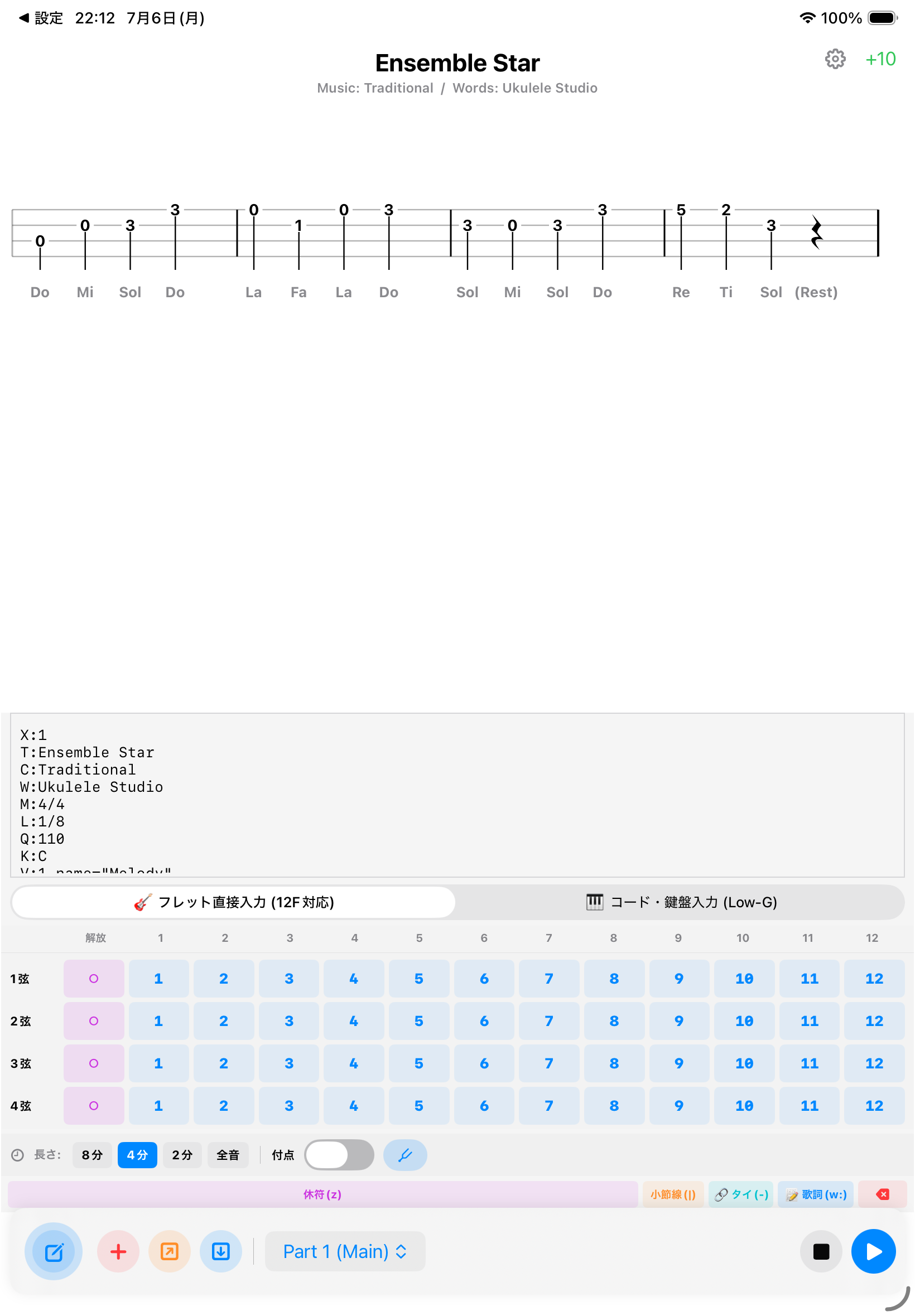
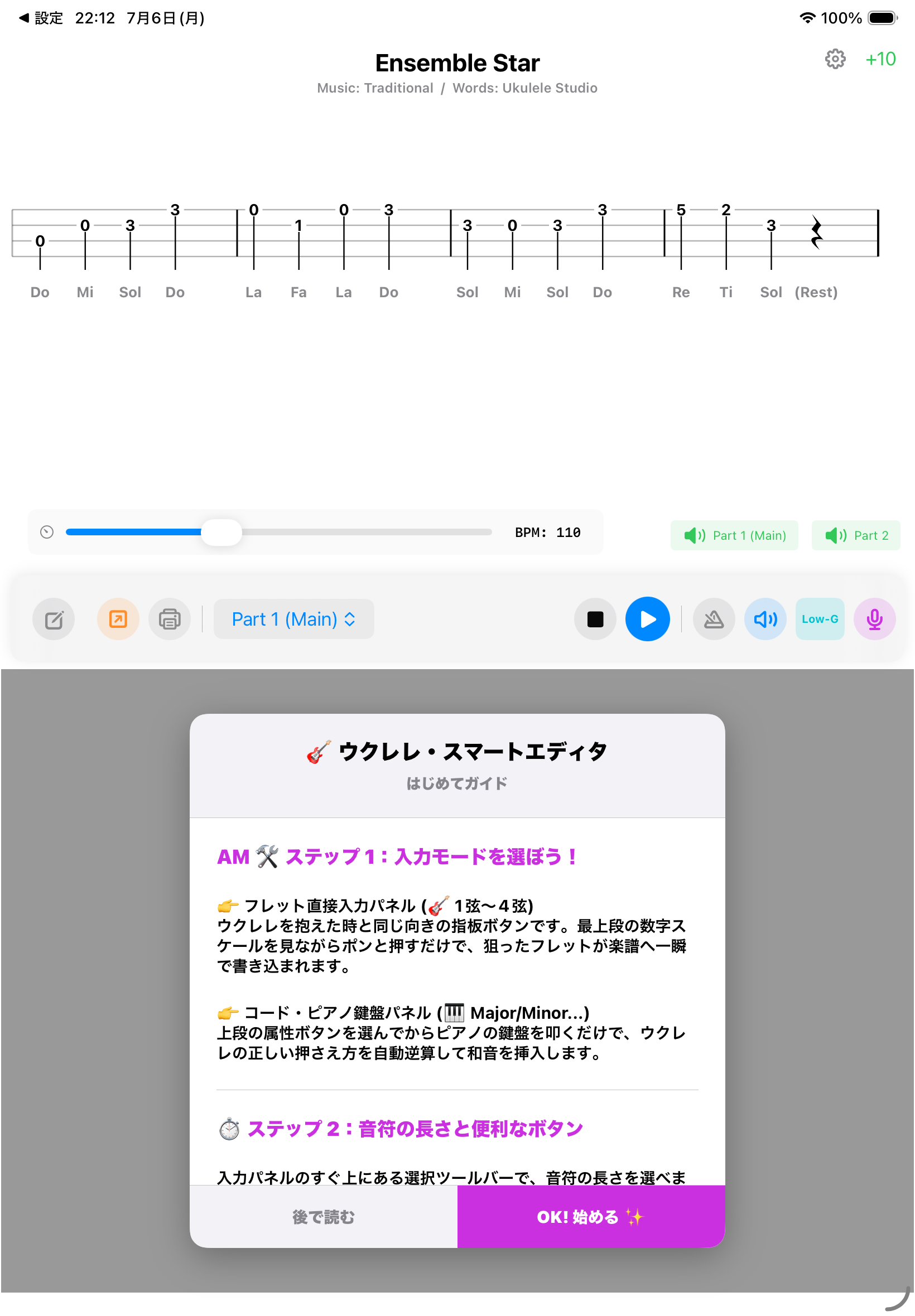
編集エリアの下にある大きなパネルから、モードをワンタップで切り替えられます。

Switch modes with a single tap from the large panels below the editor.

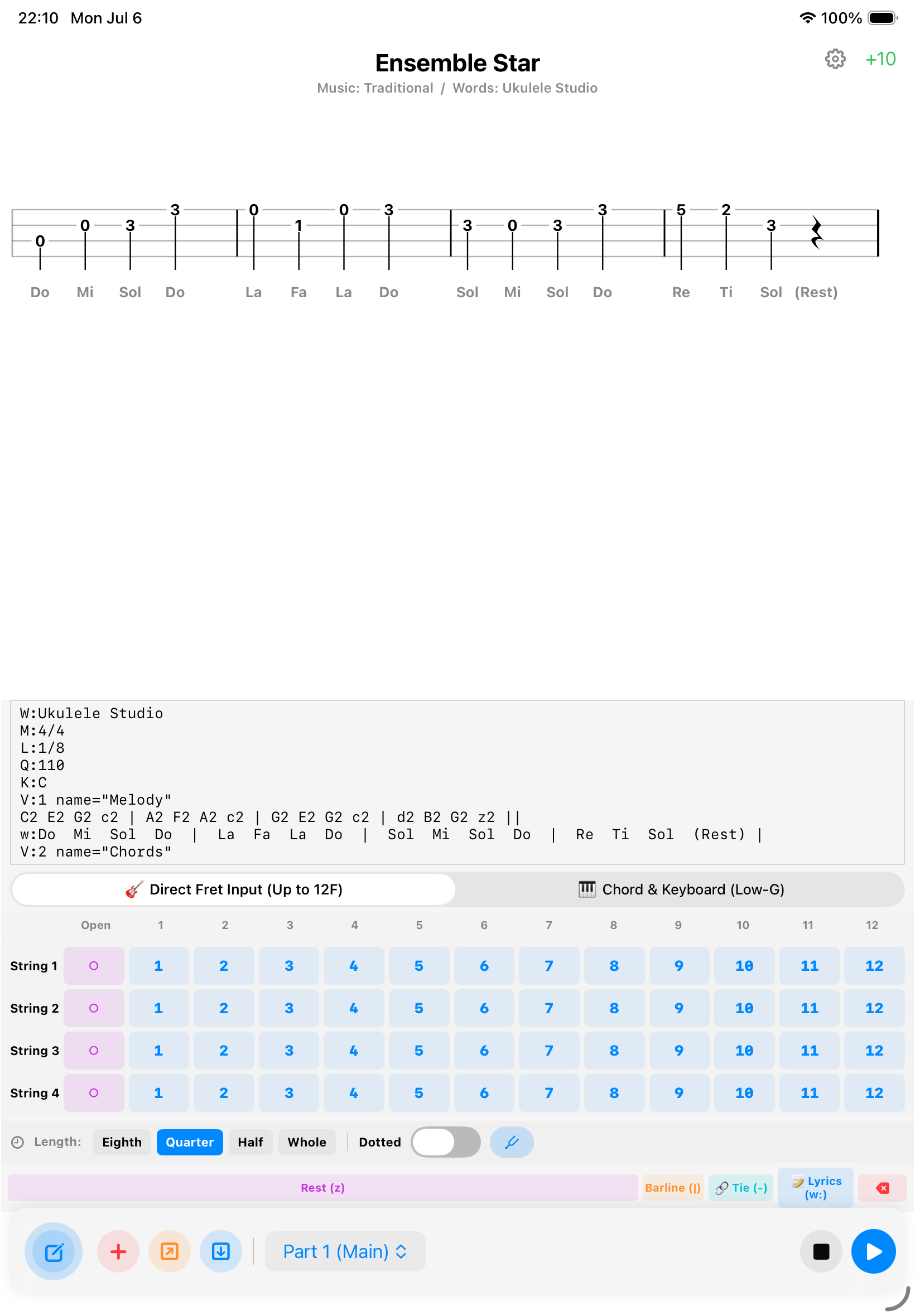
① フレット直接入力パネル(🎸 1弦〜4弦)

1. Direct Fret Input Panel (🎸 Strings 1-4)

ウクレレと同じ向き(上が1弦、下が4弦)の指板ボタンです。数字(0〜12)を押すだけで楽譜へ書き込まれます。※ ○ は開放弦です。

Matches your ukulele's layout (String 1 on top). Tap 0-12 to write instantly. Note: "○" is an open string.

指板入力 Fretboard

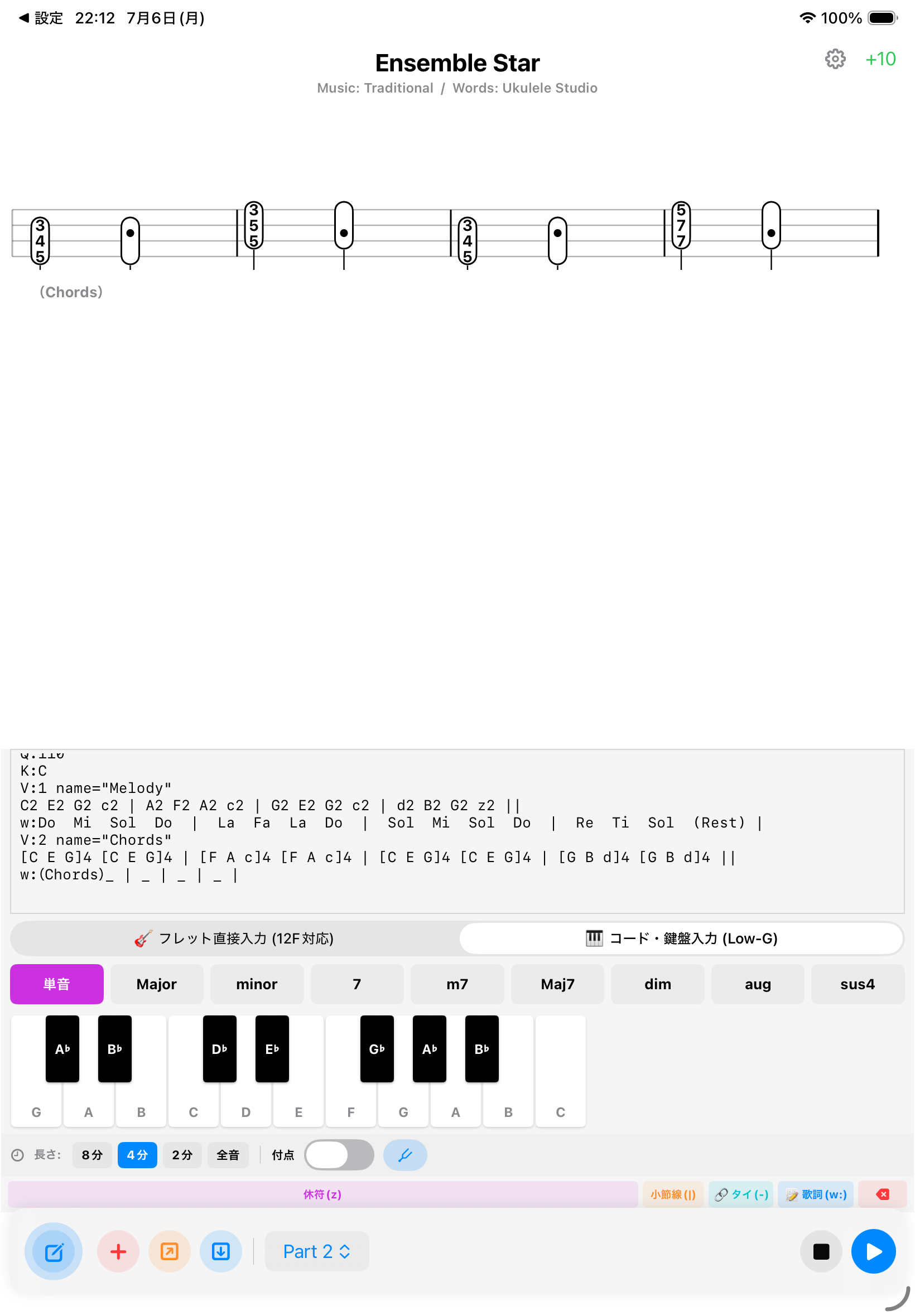
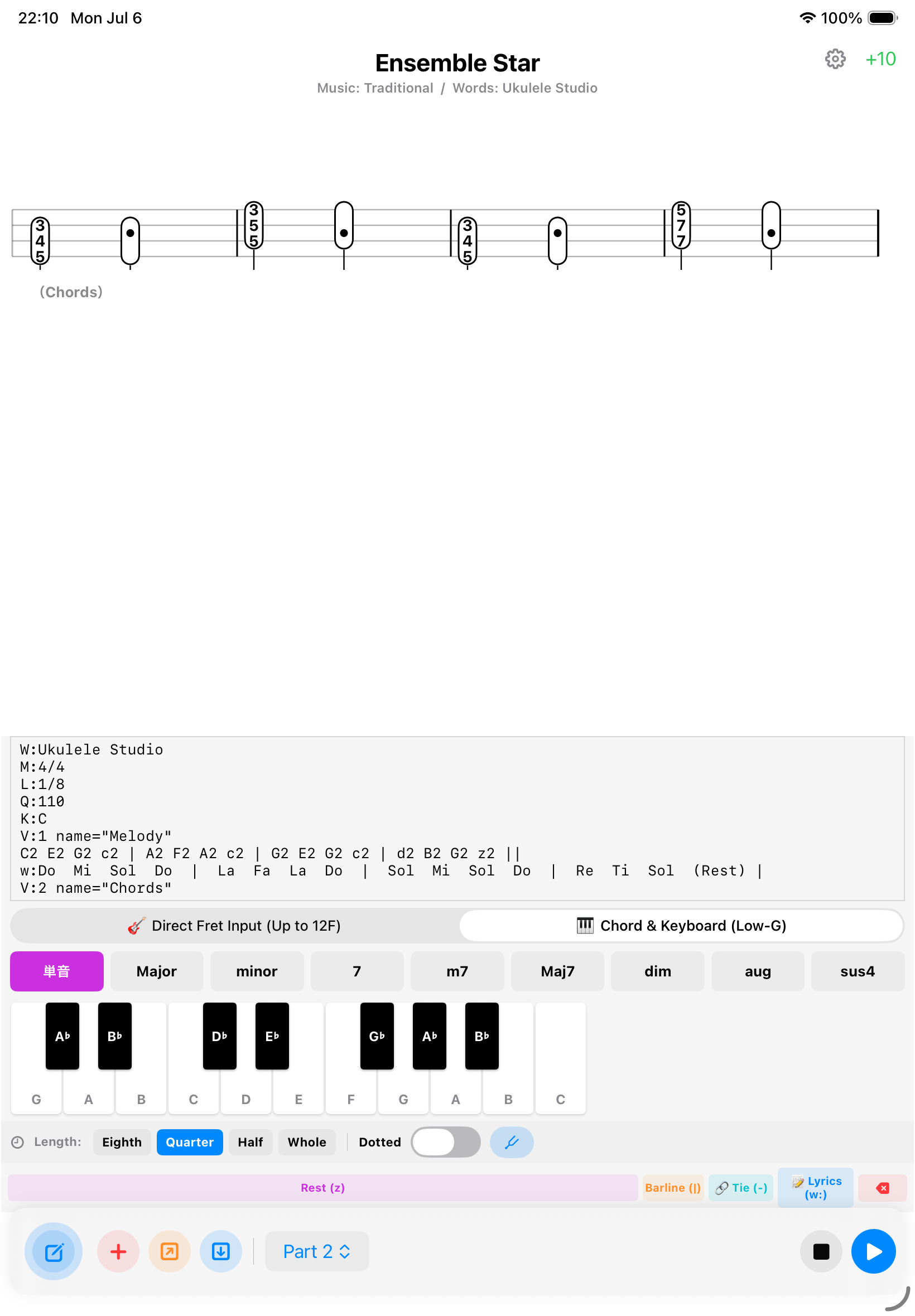
② コード・ピアノ鍵盤パネル(🎹 Major / Minor...)

2. Chord Piano Keyboard (🎹 Major / Minor...)

上段の属性(Major等)を選びピアノを叩くだけで、システムがウクレレの正しい押さえ方を自動逆算して和音を挿入します。

Select a quality (Major, etc.) and tap piano keys. The system auto-calculates the correct ukulele chord shape for you.

ピアノ入力 Piano Input

⏱️ Step 2:音符の長さと便利なボタンNote Lengths & Quick Actions

ツールバーで、次に入力する音符の長さを選べます。

Use the toolbar to select the length of the next note to input.

📝 画面最下部のアクションボタン:
休符(z)、小節線(|)、滑らかに伸ばすタイ(-)、歌詞(w:)、削除ボタンがあなたの入力をアシストします。

📝 Bottom Action Buttons:
Rest (z), Barline (|), Tie (-), Lyrics (w:), and Delete buttons assist your workflow.

📝 Step 3:歌詞を入力してみようInput Your Lyrics

1. 音符を入力後、歌詞(w:)ボタンを押します。
2. w: の後ろに、音符の数に合わせてスペースを空けながら文字を打ち込みます。
3. 小節の区切りにも | を入れると、上の音符と完全に一致して美しく自動整列します。

1. After inputting notes, tap Lyrics (w:).
2. Type after w:, using spaces to match the number of notes.
3. Use | for bar lines to align lyrics perfectly with the notes above.

🔴 Step 4:「インテリジェント警告」Intelligent Warning

拍数が足りない小節を見つけると、楽譜の右端が赤くハイライトされ自動でお知らせします。画面端で楽譜が切れてしまうバグも完全対策済みです。

If a bar has missing beats, the right edge highlights in red. The editor also prevents scores from being cut off at the screen edge.

❌ ミス: 拍数不足❌ Error: Beat Deficit

🎧 Step 5:アンサンブル演奏 & 印刷Play Ensemble & Print

青い再生ボタン: ウクレレ本来の音色で再生されます。2パート以上の楽譜ではメトロノームが自動OFFになる「賢い自動消音」機能でアンサンブルに没入できます。

Blue Play Button: Play with authentic ukulele tones. Smart Auto-mute turns off the metronome during ensembles for full immersion.

プリンターボタン: プロ品質のPDFを書き出します。ダークモード中でも「純白の紙面に真っ黒な五線譜」として大勝利な美しさで出力。最後の行も市販の楽譜本のように左詰め整列されます。

Printer Icon: Export pro-quality PDFs. Even in dark mode, it outputs beautiful "black notes on white paper." Final bars are always left-aligned perfectly.

さあ、あなただけのデジタル楽譜を作成しましょう!🎸✨

Start creating your own digital ukulele scores today! 🎸✨

サポート & よくある質問

Support & FAQ

🎫 料金・プラン・広告について

🎫 Fees, Plans & Ads

Q. アプリは無料で使えますか? Q. Can I use the app for free?
はい、楽譜の閲覧や自動演奏などの基本機能はすべて無料です。動画広告をご視聴いただくことでフリータイムが適用されます。
Yes, basic features like viewing and playback are free. You can earn free time by watching video ads.
Q. 無料プランとプレミアムプランの違いは何ですか? Q. What is the difference between Free and Premium?
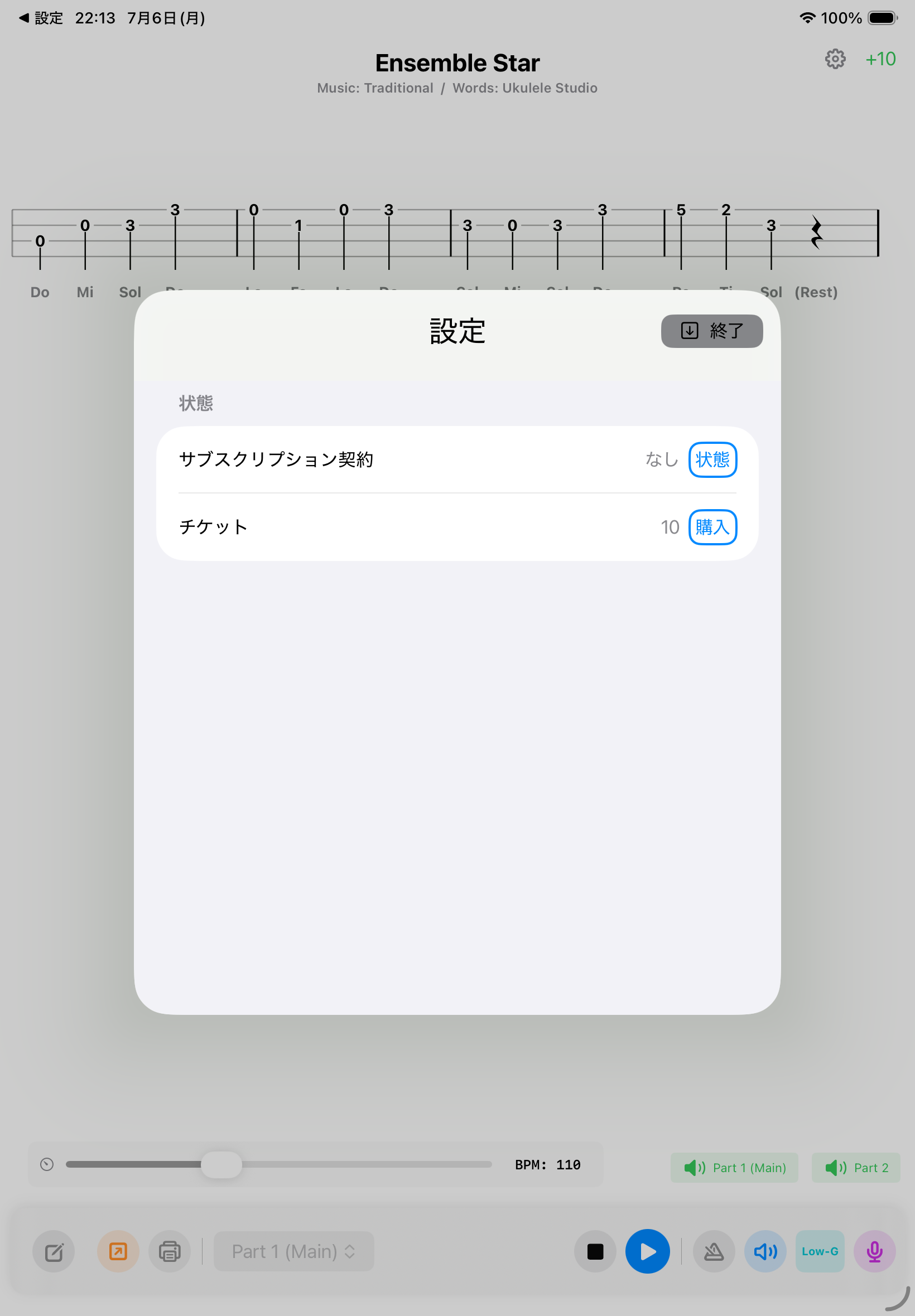
プレミアムプランでは、楽譜の編集・新規作成・保存、PDFエクスポート、直接印刷、広告非表示のすべてが解放されます。
Premium unlocks the editor (creating/saving), PDF export, direct printing, and removes all ads.
Q. サブスクリプションの解約はどこからできますか? Q. How do I cancel my subscription?
設定画面の「Cancel」ボタンからApple公式の管理画面を起動し、いつでも簡単に解約できます。
Tap "Cancel" in the Settings screen to open Apple's official management page and cancel anytime.

🎸 楽譜の表示・演奏機能について

🎸 Score Display & Playback

Q. 楽譜の途中にある「・」というマークは何ですか? Q. What is the "•" dot mark in the scores?
「スマート・インジケーター」です。同じコードが続く場合に視覚的なノイズを減らし、演奏に集中するためのデザインです。
It's a "Smart Indicator." It reduces visual noise by omitting repetitive chords, helping you focus on playing.
Q. グレーの線と太い黒い線があるのはなぜですか? Q. Why are there thin gray lines and thick black lines?
ピッキングミス防止のためです。弾くべき弦は太い黒、弾いてはいけない消音(ミュート)弦は薄いグレーで表示されます。
To prevent picking errors. Active/open strings are thick black, while muted strings are thin gray.
Q. 1人でもアンサンブルの練習ができますか? Q. Can I practice ensembles alone?
はい!再生設定から特定のパートを消音したり鳴らしたりできるため、1人でも迫力ある合奏練習が可能です。
Yes! You can mute or solo specific parts in the settings to practice along with the accompaniment.

📝 楽譜の入力・エディターについて

📝 Input & Editor

Q. 「ABCフォーマット」とは何ですか? Q. What is "ABC Format"?
音楽をテキストで表現する世界標準形式です。ネット上のデータをコピペするだけで一瞬でタブ譜を読み込めます。
A global standard text format for music. Just copy and paste data from the web to import tabs instantly.
Q. 自分で楽譜を入力するのは難しくないですか? Q. Is it difficult to input scores myself?
専用エディターの「ワンタップ・コードインサート機能」を使えば、ボタン一つで正しい和音を一瞬で入力できます。
With the "One-tap Chord Insert," you can input correct ukulele chords instantly with a single button.
Q. チューニングは「Low-G」に対応していますか? Q. Does it support "Low-G" tuning?
はい、Low-G設定に完全特化しています。ソロウクレレに最適な美しいアンサンブルを再現します。
Yes, it's fully optimized for Low-G. It reproduces beautiful balances perfect for solo ukulele.

📮 お問い合わせ & バグ報告

📮 Contact & Bug Reports

ご質問やご要望は、下記メールアドレスまでお気軽にご連絡ください。

Please feel free to contact us via email for any inquiries.

※スムーズな解決のため、ご利用のデバイス名とOSバージョンを併記してください。

*Please include your device model and OS version for faster support.

🔗 姉妹アプリのご紹介 🔗 Sister Apps

利用規約(エンドユーザー使用許諾契約)

Terms of Use (End User License Agreement)

プライバシーポリシー

Privacy Policy